
Make the current workflow visible
We clarify who handles which information, when it is used, and where the process tends to slow down.
We organize manual and fragmented workflows, then improve them through automation, visualization, and practical business tools.

Service
Digital transformation does not always need to start with a large system. Reducing repeated data entry, checking, aggregation, sharing, and approval work can already create meaningful value for a team.
Nobilwing first reviews the current workflow and separates what should be automated from what still needs human judgment. We can use existing spreadsheets, cloud services, and internal tools where they make sense, then build only the missing pieces.
Project Context
Digital transformation support is often most effective when it begins with repeated copy-and-paste work, checks, aggregation, sharing, and approval flows. We look for improvements that can be introduced without disrupting the workplace.
We clarify who handles which information, when it is used, and where the process tends to slow down.
Not everything needs automation. We separate human judgment from work that software can reliably handle.
Small tools and integrations can be introduced first, then improved as the team actually uses them.
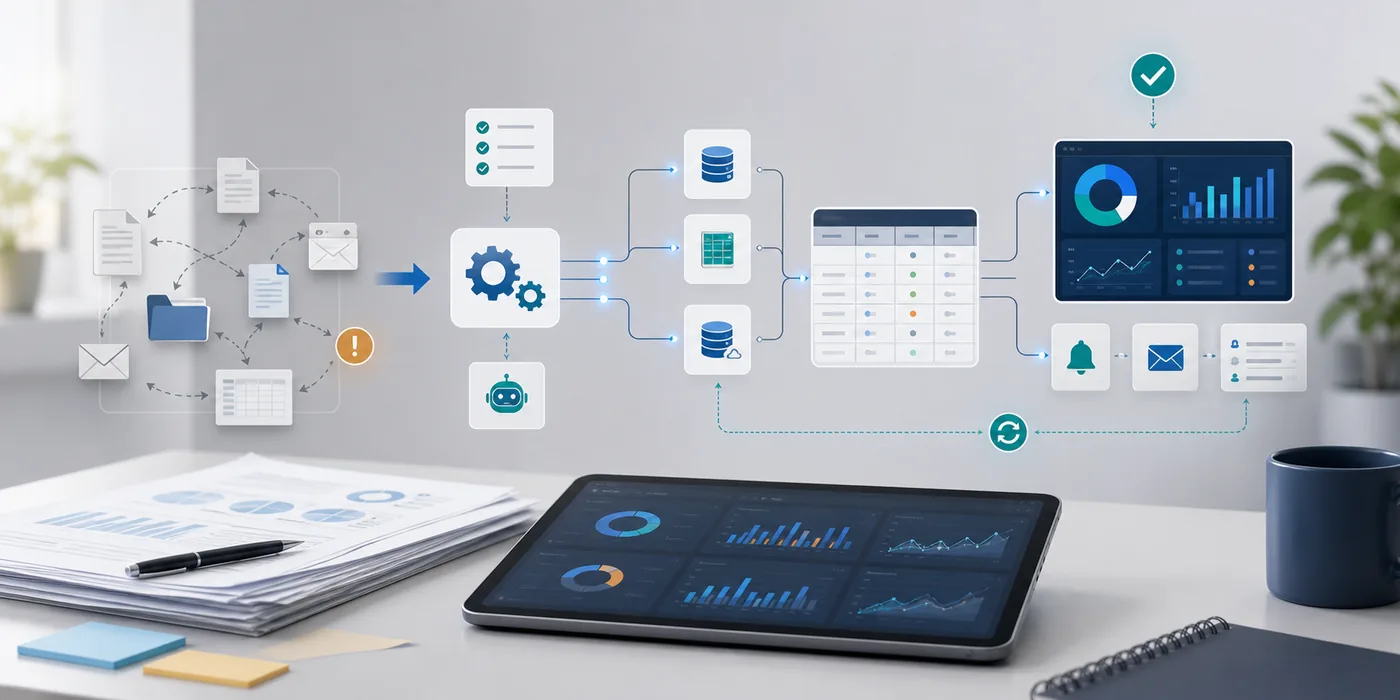
Workflow
The image shows scattered documents and manual work becoming automation, aggregation, visualization, and notification. The purpose is not to add more systems, but to make work easier to understand and manage.
Excel, CSV, cloud services, and email can be connected where the connection reduces real work.
Numbers, progress, exceptions, and pending items are arranged so checking takes less time.
The solution should fit the current way of working instead of creating a heavy new management task.
Support Areas
We do not stop at improvement proposals. We turn the plan into scripts, screens, integrations, and operating procedures that can actually be used.
We identify duplicated work, waiting time, missed checks, and processes that depend too much on one person.
Repeated work and aggregation can be reduced so the necessary information is collected naturally.
The information needed for decisions and checks can be presented as dashboards or dedicated screens.
Scope
Map work steps, input sources, reviewers, exceptions, and recurring bottlenecks.
Reduce repetitive work such as transfer, aggregation, notifications, file handling, and API-based synchronization.
Turn important numbers and progress information into views that support decisions.
Build small tools for the parts that existing services cannot handle well enough.
Deliverables
Fit
Boundary
Clear boundaries help us avoid mismatched inquiries and make the right collaboration easier to start.
Quality
We try to make the reduced work, shorter checking time, and fewer mistakes as concrete as possible.
Existing tools and habits are respected so the change can begin in stages.
Real operations include exceptions, rejections, and manual checks, so the workflow should not stop easily.
The tool itself should not create a large new maintenance burden.
Case Studies
These examples show typical problems and support scopes within what can be described publicly. Company names and logos are shown only with prior approval.
Replaced repeated manual aggregation with a small import, validation, and reporting workflow.
Designed an admin interface around permissions, search, CSV import and export, action history, and notification timing.
Next Step
After reviewing the service scope, continue to practical articles and checklists that help prepare an inquiry.
Related articles
Before automating Excel or CSV work, check frequency, exceptions, validation rules, output format, and what humans must still decide.
Admin ToolsBefore designing an admin interface, decide permissions, action history, CSV import/export, search conditions, and exception handling.
Checklists
Questions that help clarify whether repeated spreadsheet work can be automated safely.
Companies considering business apps / development companiesItems to decide before building an internal tool or management screen.
Solution
If you want to begin from a concrete problem rather than a broad service category, these pages organize the scope and preparation items.
We separate repetitive steps, error-prone work, and human judgment so automation fits the real workflow instead of hiding exceptions.
SolutionBefore building screens, we clarify who can view, edit, approve, and audit each action so the tool fits real operations.
Process
Confirm tools, people, frequency, pain points, and current exceptions. The initial discussion and high-level scope check are free.
Review spreadsheets, CSV files, cloud services, internal tools, and manual steps to identify improvement candidates.
If detailed workflow interviews, data checks, or existing tool research are needed, we normally quote that paid discovery work before it begins. Until the end of August 2026, the initial high-level discovery fee may be waived when named case-study publication, including company name and logo, can be discussed. Case-study content and logo usage are confirmed in advance and published only within the approved scope.
Present the first scope, expected effect, risk, rollout method, deliverables, timeline, and fee.
Paid improvement work begins only after the quote is approved and the order or contract is in place.
Start with minimum useful automation or a small tool, then confirm whether it works in real operations.
Adjust exceptions, reports, and additional features after real use. Added scope is quoted separately.
Limited Offer
The initial consultation and high-level scope check are free. Until the end of August 2026, initial high-level discovery may be waived when named case-study publication can be discussed.
Contact us about development needs, technical challenges, or collaboration opportunities.